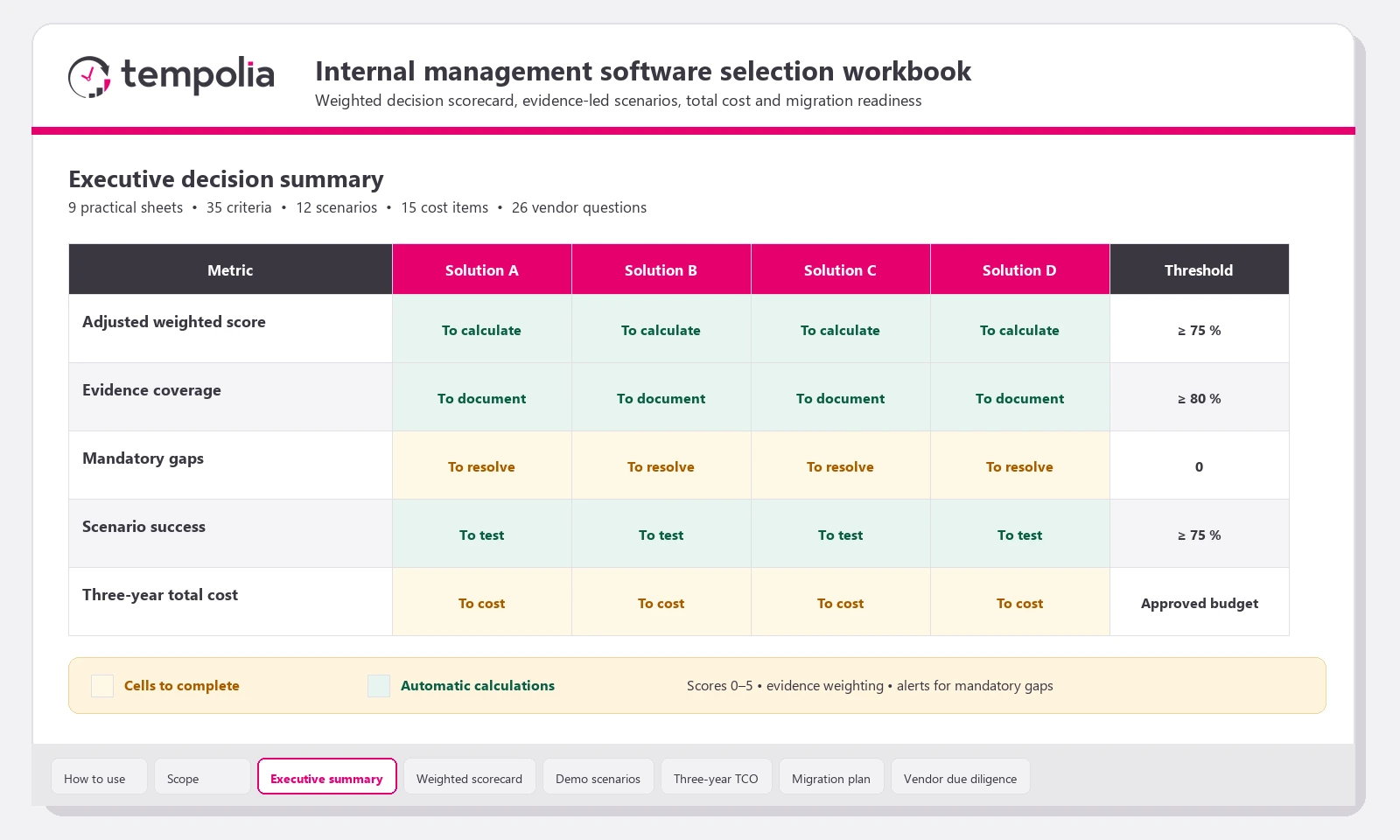
Start with five to eight real scenarios — entering time, preparing an invoice, allocating a payment, reviewing margin and replacing a staff member — then score each solution on observable evidence. Assess scope, adoption, migration, security and total cost separately. A generic demonstration is not enough.
Define the scope before approaching vendors
Internal management software connects clients, engagements or matters, time, expenses, budgets, invoices, payments and indicators. It does not necessarily replace accounting production, payroll or specialist document management systems. The requirements must therefore state which data remains in each system and which exchanges are required.
Record user groups, entities, annual volumes, billing rules and period-end constraints. Include difficult cases: an overrun on a fixed fee, payment on account, credit note, manager change, multi-entity client, negotiated rate or departing employee.
Use a weighted scorecard and require evidence
| Criterion | Control question | Expected evidence |
|---|---|---|
| Permissions | Who can view, change, approve and export? | Matrix tested with three roles |
| Billing | Can staff prepare, amend and approve without losing the audit trail? | Scenario from time entry to payment |
| Management reporting | Can a report total be reconciled? | Drill-down or export of source rows |
| Migration | How is completeness proved? | Before-and-after totals and issue log |
| Portability | Which data and documents can be returned? | Contractual format, timing and owner |
Compare cloud and on-premises deployment
Cloud delivery generally reduces local operations and simplifies updates, but hosting, backups, administrative access, availability and data portability still require review. On-premises deployment places more responsibility on your team: operating systems, databases, patches, monitoring, backups and restoration tests. Compare actual responsibilities, not licence prices alone.
Plan migration and adoption
- Inventory files, databases, interfaces and data owners.
- Clean duplicates and decide which history to migrate.
- Test a representative sample with control totals.
- Pilot with a limited group before the main cutover.
- Train by role and measure usage, issues and time-entry delays.

Calculate the three-year total cost
Add licences, migration, configuration, interfaces, training, data preparation and internal effort. Deduct only benefits supported by an explicit method. For example: 25 users × 15 minutes saved per week × 46 weeks = 287.5 hours per year. Value those hours using a documented rate, without assuming that all released time immediately becomes billable.
Make the decision with pass/fail criteria
Before reviewing weighted scores, define non-negotiable points: contractual compliance, separation of duties, data export, migration capability, critical functions and compatibility with existing tools. A strong average score cannot compensate for a missing key control.
See also: Tempolia functional scope, security, compliance and hosting, integrations and APIs, training and the Tempolia operational FAQ.